QRWave QR-code ordering and inventory app
This project archive records mobile and web software AHG built for restocking orders and inventory work. A field or warehouse worker could scan a product QR code or UPC barcode and send a request to the office or an order to the supplier.
Connect field or warehouse stock to the ordering office
The source described a gap between a field or warehouse worker who could see stock running low and office staff who placed the order. QRWave was also described for B2B, B2C, and internal inventory use.
What AHG built for scanned restocking orders
AHG built a website and mobile application combination. A worker could scan a product QR code or UPC barcode, then send a restocking request to the office or an order to the supplier through the configured path.
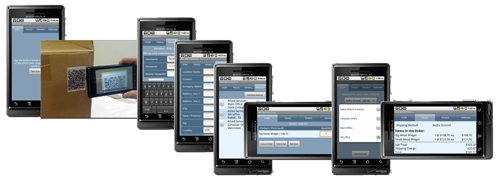
How a scan started the ordering path
- 01 Find low stock A field or warehouse worker identified the product that needed replenishment.
- 02 Scan the label The worker scanned the available product QR code or UPC barcode with a phone.
- 03 Build the request The mobile and web flow used the identified product in the restocking action.
- 04 Send it forward The request moved to the office or the order moved to the supplier, depending on the configured job.
What this ordering archive supports
The source supports the B2B, B2C, internal-inventory, field, warehouse, QR-code, UPC-barcode, office, supplier, and restocking uses recorded here.
It does not provide shortage reductions, shipping savings, order totals, current availability, or a current customer relationship.
Talk through the work
Discuss a current custom software project
Tell us what your crew needs to capture. We will help map the current process and the next practical step.