Create reports from field forms and workflow records
Turn submitted field forms into records your office can filter, review, chart, and export. Choose the records and fields needed for the job, then create a table, graph, statistical summary, CSV file, or PDF report.
Find the field records you need
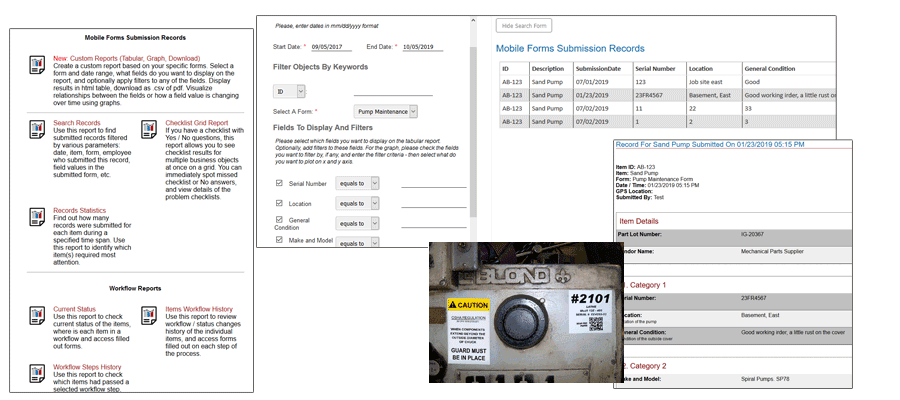
Reporting starts with data submitted through field forms and workflow records. Authorized office staff can filter the record list by a date range, asset or equipment, form, and entered values such as a customer, work order, reading, or failed check.
Combine available filters to narrow the list before opening a record or building a report. The useful fields depend on what the crew actually captured in the mobile form.
Create reports for workflow and operations
Choose the fields the office needs, such as the job, equipment, work performed, finding, technician, date, or status. Build a record list or custom report for service work, inspections, work orders, project progress, or workflow history.
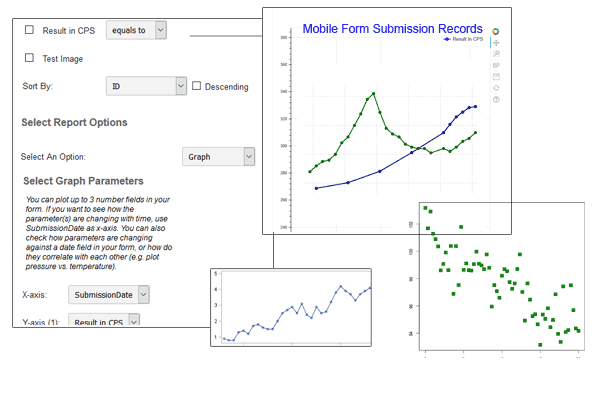
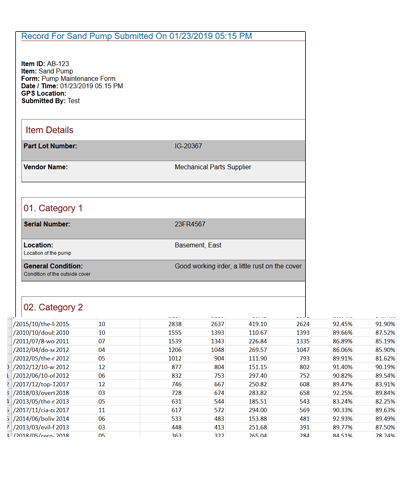
The retained screens below come from the existing AHG reporting page. They document source-supported report, chart, and statistics views, but they are not a promise that every configured account has an identical interface.
Plot trends, compare values, and review statistics
Numeric fields can be plotted over time or against one another. For example, a service manager could review a recorded temperature over several visits or compare two readings from the same inspection form. Several numeric fields can also be shown together when the report supports that comparison.
Supported statistical summaries include count, sum, minimum, maximum, and average. A useful result still depends on consistent field entries, suitable filters, and a form that collects the values needed for the question.
Questions from the job
Frequently asked questions
What reports can teams create from mobile forms?
Teams can use submitted form data for record lists, custom reports, workflow history, progress information, statistical summaries, and plots or graphs supported by the collected fields.
How can a team analyze collected field data?
Authorized staff can filter records by date, asset or equipment, form, and entered values; choose report fields; plot numeric values over time or against one another; and review supported statistical summaries.
Can reporting data be used outside QR Mobile Data?
The source system supports CSV and PDF downloads, PDFs based on configured Word templates, and a custom API endpoint for internal software. Confirm the exact export, template, and API setup for your deployment.
Talk through the work
Discuss your reporting needs with AHG
Tell us what your crew needs to capture. We will help map the current process and the next practical step.